
Cybersecurity & Cyber Addiction Policy
DSafe: Diyafah Cyber Security & Cyber Addiction Policy
While Technology devices and the internet have become an essential part of our personal, professional and educational lives, it is important that we all understand its acceptable usage and become aware of acceptable usage as well as how to stay safe from online predators and the threats in the Digital world online.
As part of Diyafah Schools online safety and Cybersecurity Policy, this DSafe document is prepared with the intent to educate, guide and to ensure online safety of Diyafah Systems, Staff and Students.
Diyafah Networks
- Diyafah Innovation and Technology Team monitors, manages and conducts periodic updates on core devices, as and when necessary to ensure the safety and security of Diyafah networks.
- Network access is restricted and managed by implementing security solutions, to prevent unauthorised access as well as to keep the environment safe from exploitation and external threats.
- Periodic Vulnerability Assessments are undertaken by a competent third-party provider, to identify gaps to be fixed. Gaps identified are noted for improvement and implemented in the following School breaks.
- Firewall policies are re-visited for review and reforms as and when there are developments noticed either in the operational environment or on becoming aware of a Global Technological development.
Cyberbullying
- Diyafah Schools have a zero tolerance approach to bullying.
- Any instance of bullying, whether online or on-premises, is prohibited, and disciplinary actions as stipulated under Diyafah Safeguarding Policies will be applied to reported instances which get verified as inappropriate online behaviour.
- Diyafah takes all reasonable steps by implementing necessary policies as well as technology tools and solutions, to ensure that students are protected within the school premises and online.
Emails and Phishing
If you are not expecting an email from the source/sender and it seems suspect, please delete such emails without opening. Always check the sender's email; if the email is not as it should be, the spelling is incorrect or suspicious, then it is a SPAM email trying to get your details (example: invoices@westandardcharteredbankcompany.com). Use caution when clicking any links/URL sent to you from an external email. Do not forward the suspect email to anyone asking for guidance. By forwarding, you end up distributing a potential threat to many others.
If in doubt, always call your I.T. Team on Teams or on extensions 204, 261 or 227.
To make it easier for you to quickly identify emails delivered to your mailbox from outside of Diyafah Schools, our mailing system labels it in the subject as [External]:
If you miss the subject as [External]: and happen to unknowingly open the email, a highlighted message ("CAUTION: This email originated OUTSIDE of the Diyafah School network.") will be displayed notifying you this message is not from within Diyafah Schools.
And for the benefit and safety of the recipient, a disclaimer is auto appended to all emails generated from Diyafah Mailing Servers. The disclaimer indemnifies Diyafah towards confidentiality, unauthorized access and exposure to threats.
- Do not use your official email IDs on random websites, which expose your email to phishing. In the event you receive any email impersonating our school email ID, the [External]: tag will notify you of its origin from an external source.
- Do not click on any links within the email and open any attachments with subject as [External]: if you are not sure of the sender.
- Emails that do not have links or attachments could request interaction and will request various information. This is an attempt at Social Engineering, which compromises the organisation with critical information related to business or technology systems. Be aware and do not engage with unsolicited and/or strange email or telephone communications.
- Do not forward such emails to anyone, not even to the helpdesk. Open a new email, then right click on the suspicious email. Copy and paste into a new email and send it to helpdesk@diyafahschool.com with any details you wish to share.
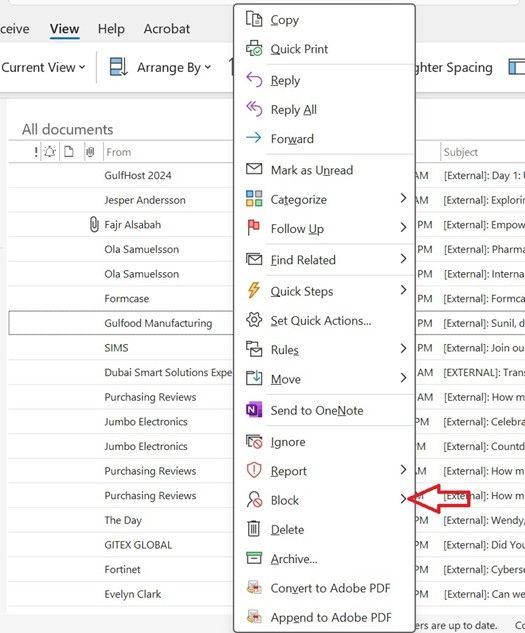
- Mark suspicious emails as SPAM and, if you are sure the email originated from a malicious sender, block the sender or sender's domain, to prevent receiving any emails from them again.
Secure Device Usage and Data Storage
- Do not save your data on the laptop/computer. Always store all files on OneDrive or the Shared drive on the Diyafah Server.
- Data saved on laptop/computer cannot be restored in the event of a disk crash or corruption. However, data on OneDrive and the Diyafah Server can be recovered.
- Do not download/install any unauthorised software, tools or applications from a website or content provider whom you do not trust.
- Do not share personal data/email without approval – if you are in doubt or need advice in a situation, please send your request to helpdesk@diyafahschool.com.
Password – Best Practice and Guidelines
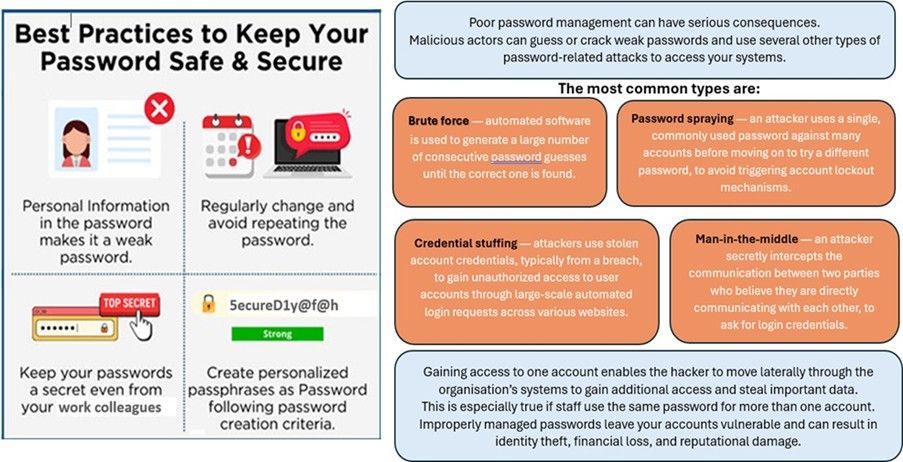
- Take passwords seriously, very seriously. It should not be less than 8 characters long and must contain at least one capital letter, one special character and one number (e.g., St@y5ecure).
- Follow the precautions you take for your banks. Set your logins for dual authentication, to receive a verification code as SMS to your mobile or email.
- Do not share your passwords under any circumstances. If you have had to share it for any unavoidable circumstances, then change your password once the situation is dealt with.
- Do not reuse passwords. Always generate a new password.
- Do not use another user's credentials.
Internet Usage
- Do not use any Virtual Private Network (VPN) to gain internet access. UAE regulation states that if VPN usage is identified as being used for the purpose of committing a crime or to prevent internet activity discovery, it is punishable by temporary imprisonment and a fine not less than AED 500,000 and not in excess of AED 2 million, or either of these two penalties according to Article 42 of the Cybercrimes Law, which states: "The court may decide deportation of a foreigner who is condemned in any of the crimes specified in this Decree Law upon execution of the punishment adjudged."
- Do not access illegal sites to bypass security, use free services, or download digital content such as software, freeware, movies, music, etc. This could expose you to malware, ransomware, etc. You could be breaking the law by accessing banned or blocked sites, and/or committing copyright violations.
- Do not save your passwords online. While it might be convenient, this practice exposes you to become more vulnerable to hackers.
- Do not click on pop-up links which might offer free software or tools, as most such pop-ups are scams. Always visit the software provider's website to install the required software.
Online Communication, Chats and Social Media
This policy must be read in conjunction with Terms and Conditions for BYOD and Microsoft 365, which remains binding and applies in addition to the rules defined in this policy.
Diyafah Schools provide students with a full version of the Microsoft 365 suite to enhance and facilitate new age learning and communication methods. However, technology and tools will need to be used with care, diligence and with set boundaries towards acceptable actions and behaviours by students.
This document comprises the rules for use of Online Communication Tools and Chats by students at Diyafah Schools.
- In all communications, whether written or oral, be respectful towards classmates, teachers and members in chat or online forum.
- Do not post images or videos of classmates or any other staff.
- During conversations, be respectful towards opinions and any interventions by others.
- Do not write anything or everything in Capital/Block letters as this indicates shouting.
- Always ensure you check your grammar and spelling, to ensure the correct message is passed and is not misunderstood by others.
- Any questions raised should be clear and concise, for correct understanding.
- Use clear and simple language, for effective communication.
- Always read the messages contributed previously by others and avoid repeating.
- Remain focused by staying on the topic or theme and avoid personal comments or diverting to irrelevant topics.
- Be punctual and participate in forums and chats, without leaving it for the last minute.
- Any ground rules, schedule and/or instructions shared by the teacher for the activity must be adhered to and followed in all online communications including chats and online forums.
- Be prepared by finishing reading and/or completing activities that have been assigned by the teacher, before participating in chats or online forums.
- Take advantage of the resources provided by Diyafah Schools in forums and chats to enrich yourself with information for enhanced learning.
- Always read and familiarise yourself with the rules of every chat and/or forum you participate in.
Cyber Addiction
What Is Internet Addiction?
Internet addiction, which is also called problematic internet use or internet dependency, is a behavioral condition marked by excessive, compulsive, or out-of-control use of the internet that causes problems in many areas of a person's life.
Internet addiction is characterized by an uncontrollable desire to be online, to the point where internet activities dominate and undermine daily routines, social connections, professional or academic performance, and even physical health.
While time spent online can be immensely productive, when it becomes a compulsion it can damage grades, a scholastic career, work, and relationships. When a student feels more comfortable with online pals than off-line friends, or can't stop playing games, gambling, or compulsively checking smart devices, that student may have a cyber addiction.
Problematic smartphone or internet use has been linked to lower life satisfaction and mental health symptoms such as depression, low self-esteem, anxiety, lack of sleep and obsessive-compulsive behaviour, with children and young people the most vulnerable.
Signs and Symptoms of Cyber Addiction
Signs and symptoms of cyber addiction vary from person to person. Here are some general warning signs:
- Losing track of time online: Frequently the student loses track of time and stays online longer than intended. Do a few minutes turn into a few hours? Does the student get annoyed if his or her time online is interrupted?
- Having trouble completing tasks at work or home: Is the student falling behind on homework and studying? Perhaps the student often studies late because he or she cannot complete work on time due to unhealthy online habits.
- Isolation from family and friends: Is the student's social life suffering because of excessive time spent online? Is the student neglecting family and/or friends? Does the student feel like no one in "real life" — even a girlfriend/boyfriend — understands him/her like his/her online friends?
- Feeling guilty or defensive about internet use: Is the student tired of friends, a partner, and/or family nagging him/her to get off the computer or put away the smartphone? Does the student hide internet use or lie about the amount of time he/she spends on the computer or a smart device?
- Feeling a sense of euphoria while involved in internet activities: Does the student use the internet as an outlet when stressed or sad, or for gratification or excitement?
Internet or computer addiction can also cause physical discomfort, such as:
- Carpal tunnel syndrome (pain and numbness in hands and wrists)
- Dry eyes or strained vision
- Backaches, neck aches, or severe headaches
- Sleep disturbances; and pronounced weight gain or weight loss
Social media is one of the main channels via which internet addiction may spread. Users can publish updates, photographs, and videos, as well as like, comment, and direct message others on social media networks. Parents should also lead by example, modeling healthy internet behavior themselves. Parents can help manage internet addiction in teens by initiating honest conversations about internet use, establishing reasonable and clear boundaries, encouraging alternative activities, monitoring online activities, and leading by example. Parents should talk to their teens about how they use the internet in an open and nonjudgmental way.
Begin the dialogue by expressing your love and care for the wellbeing of your teen. Instead of using accusing language, focus on your observations and concerns about their internet use. You should also encourage your teens to share their opinions and experiences with the internet. Setting reasonable and clear boundaries on screen time is also essential in avoiding excessive internet use. Establishing precise daily or weekly limitations on gadget usage, for example, especially during study or family time, might help achieve a healthy balance.
At Diyafah Schools, We Are Committed to Fostering a Healthy Digital Environment by Implementing the Following Guidelines
- Balanced Digital Screen Time: We prioritize a balanced approach to digital screen time, ensuring that students engage in both offline and online activities. In lessons, 21st century skills like collaboration and critical thinking are emphasised.
- Mobile Phone Usage: Mobile phones are permitted only with prior approval, allowing us to maintain a focused learning atmosphere.
- Classroom Device Regulation: Devices are utilized in the classroom strictly according to the device days timetable. To promote active participation and social interaction, device usage is not permitted during break times.
- Post-COVID: In response to the changing educational landscape following the pandemic, we at Diyafah Schools recognize the importance of digital education. We consistently provide our students and parents with guidance on safe and regulated browsing practices, reinforcing the need for responsible technology use within defined limits.
Each one of us must remain aware and act responsibly to keep Diyafah systems safe for each one of us. Safety and security of Diyafah Data is a collective responsibility!
This is a DSafe Initiative by Diyafah Schools, and we request all students and staff to follow the guidelines/policies to ensure online safety.
Book a School Tour
You can call our admissions team from
7:30 am to 4:00 pm, Monday to Friday
- Email id: registrar@diyafahschool.com
- +971 4 2671115 Ext. No - 223 / 214